
Lucky 91 Deposit and Withdrawal Guide
Add money to Lucky 91 and take your winnings out. Both run through JazzCash and Easypaisa. This guide shows each step.
How to Deposit — Step by Step
- Open the app and tap the wallet or cashier icon.
- Tap Deposit.
- Choose JazzCash or Easypaisa.
- Type the amount you want to add.
- The app shows you where to send it. Approve the transfer in your JazzCash or Easypaisa app.
- Go back to Lucky 91. Your balance updates.
Money usually shows up in minutes. If it takes longer, see the problems section below.
How to Withdraw — Step by Step
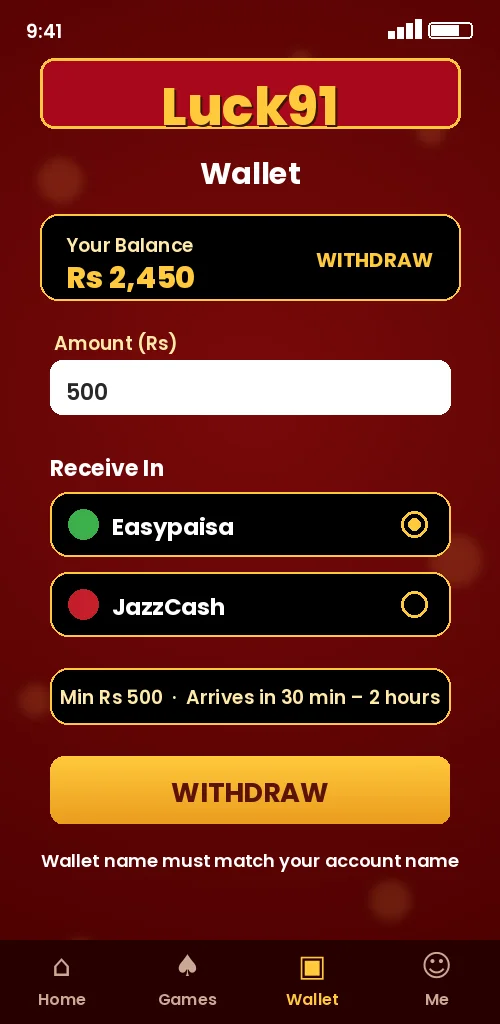
- Open the app and tap the wallet or cashier icon.
- Tap Withdraw.
- Link your wallet number first if you have not yet. Use a JazzCash or Easypaisa number in YOUR name.
- Type the amount you want to take out.
- Check the number twice. One wrong digit sends money to a stranger.
- Tap Confirm. The payout goes to your wallet.
Link Your Wallet Number (Important)
Before your first withdrawal, bind your wallet number to your account:
- Go to account settings or the cashier.
- Find “Bind wallet” or “Link account”.
- Enter your JazzCash or Easypaisa number.
- It must be in your own name — the same name as your account.
- Confirm with the SMS code if asked.
Name mismatches are the #1 reason withdrawals fail. Get this right once and you are set.
Deposit and Withdrawal Problems
| Problem | What to do |
|---|---|
| Deposit not showing | Check your wallet app’s history. Confirm the transfer went out. Then contact support with the transaction ID. |
| Withdrawal rejected | Almost always a name mismatch. Your wallet number must be in your own name and linked. Fix it and retry. |
| Withdrawal stuck “processing” | Wait the stated time first. Then contact support with the transaction ID and a screenshot. |
| Wrong number entered | Contact support at once. Give the transaction ID, the wrong number, and the right number. |
| App shows an error | Screenshot it. Restart the app. If it repeats, send the screenshot to support. |
Golden rule: never send money to a personal number from a chat. Real deposits happen only inside the app.
Amounts, Fees, and Times — The Honest Part
We could not verify these numbers:
- Minimum deposit amount
- Minimum withdrawal amount
- Any fees
- Typical waiting times
These change between app versions. Other sites publish exact figures. We cannot confirm them, so we will not print them. Check the numbers on YOUR screen when you transact — that is the only figure that counts.
Smart Money Habits
- Start with a small deposit. Test the system first.
- Withdraw once early. Make sure payouts reach your wallet.
- Save every transaction ID. Screenshot confirmations.
- Do not keep a big balance sitting in the app.
- Set a spending limit before you play. Stick to it.
Deposit & Withdraw FAQ
How long does a deposit take?
Usually minutes. If it has been over an hour, check your wallet history, then contact support with the transaction ID.
How long does a withdrawal take?
We could not verify typical times. Give the app’s stated window a chance before you worry.
Can I use someone else’s JazzCash number?
No. Use a wallet in your own name. Mismatched names get withdrawals rejected.
Is there a daily limit?
We could not verify limits. Check the cashier screen in the app for current figures.